Home Credit - Partner API - ORDER - Future
API documentation for Home Credit API for partners.
Version of documentation:
3.4.0(12/2025)
In case of any question, please contact our integration department (integrace_eshop@homecredit.cz).
| Version | Release | Release date | News |
|---|---|---|---|
| 3.4.0 (12/2025) | CS135 | 8.12.2025 | Migration guide |
| 3.2.1 (04/2024) | CS115 | 13.2.2024 | One new resource was published: API health check |
| 3.2.1 (02/2024) | CS113 | 13.2.2024 | Two new resources were published: Cancel Application and Get Application Detail |
| 3.1.1 (01/2024) | CS112 | 17.1.2024 | New version of API |
IMPORTANT NOTE: Resource calls made from Slovakia MUST use appropriate dedicated
.skendpoints. E.g.https://api.homecredit.sk/financning/v3/applications
Getting started
This online document describes Home Credit API for partners - the means for partners through which they can offer their customers the benefits of one of Home Credit's payment methods or products.
Described services aim to allow customers the smooth running through the process of an online purchase or loan arrangement. The services that allow achieving this goal are divided into the following groups:
| Group of services | Purpose |
|---|---|
| Security | Security rules and principles |
| Application resources | Resources that allows processing of application during its whole life cycle |
| Merchantsite resources | Resources that should be developed and exposed by a partner to allow HC asynchronously inform it about important changes regarding particular applications |
Basic implementation
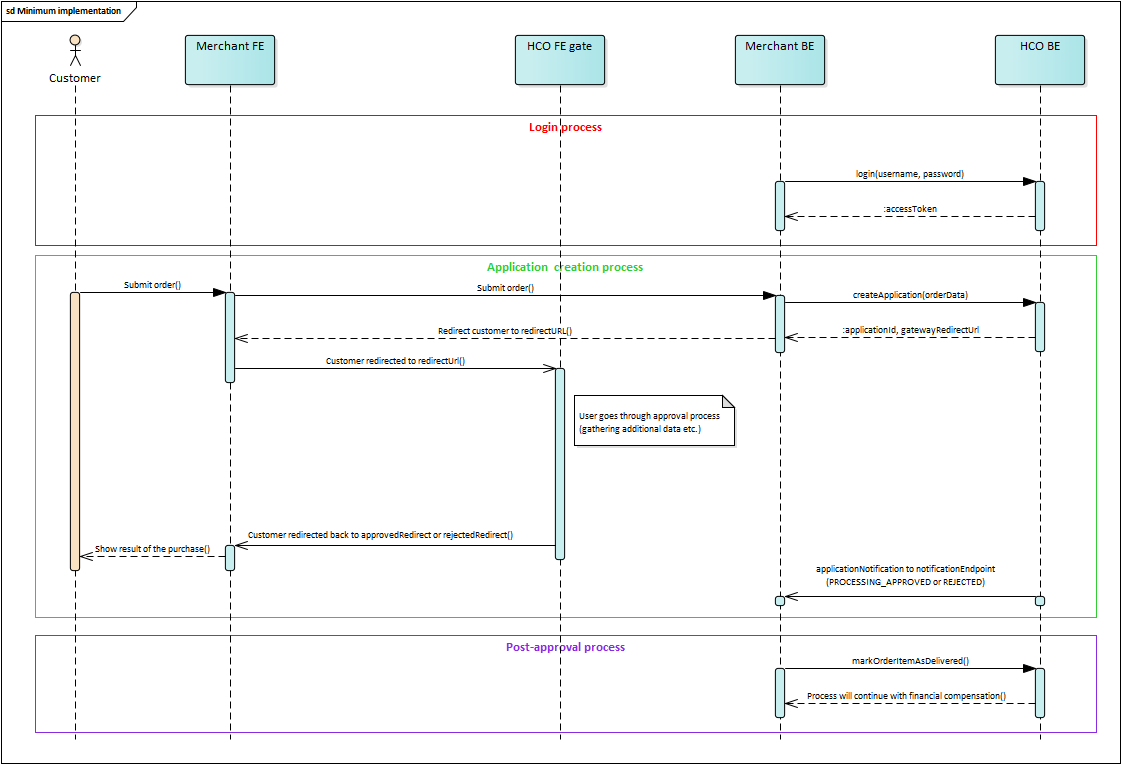
The basic and minimum way how to implement HCO API is to at least implement:
- Login
- Partner must be authorized to be able to access the most resources
- Create application
- Partner calls this resource to start the loan approval process by creating an
application.Applicationitself and its ID are essential for successful process completion.
- Partner calls this resource to start the loan approval process by creating an
- Redirect handlers.
- Special URLs for customers that shows payment success or rejection (more info here).
- Application notification
- This endpoint has to be exposed on your side to allow HC back-end to asynchronously notify you about the important changes regarding particular applications.
- Mark order items as shipped/delivered
- Home Credit does not start the process of financial compensation unless the
orderis marked asSHIPPEDorDELIVERED.
- Home Credit does not start the process of financial compensation unless the
It is necessary to fill in all attributes marked as 'required' in the request. Filling optional parameters will result in a better application approval rate. Partner should always consider filling as many attributes as possible.
Documentation principles
-
attributes in request/response object are optional unless stated otherwise (
requiredflag under attribute name) -
a required attribute in an optional object means, that if an optional object is specified, it must contain the required attribute.
-
all values in request/response attributes are just examples, except for enum values - these are the only possible values for the given attribute.
-
documentation adheres to semantic versioning, which makes a distinction between major, minor, and patch versions.
Naming conventions
-
we use camelCase for all object and attribute names
-
we use CAPITAL_UNDERSCORE for enum values
-
we use plural in resource names
Key words used in this document (RFC 2119)
The key words "MUST", "MUST NOT", "REQUIRED", "SHALL", "SHALL NOT", "SHOULD", "SHOULD NOT", "RECOMMENDED", "MAY", and "OPTIONAL" in this document are to be interpreted as described in RFC 2119.
Home Credit REST API principles
Request restrictions
Please, keep in mind following restrictions regarding requests:
-
Maximum request size is 10 MB.
-
Maximum size of accepted single file is 500 kB.
-
Here is the list of supported files:
| MIME type | Example(s) |
|---|---|
| application/pdf | |
| application/vnd.openxmlformats-officedocument.spreadsheetml.sheet | *.xlsx |
| application/vnd.openxmlformats-officedocument.wordprocessingml.document | *.docx |
| application/vnd.openxmlformats-officedocument.presentationml.presentation | *.pptx |
| application/vnd.ms-excel | *.xls, *.xlt, *.xla |
| application/msword | *.doc, *.dot |
| application/vnd.ms-powerpoint | *.ppt, *.pot, *.pps, *.ppa |
| plain/text | *.csv, *.txt |
| image/jpeg | *.jpg, *.jpeg |
| image/png | *.png |
| image/gif | *.gif |
API calls limits
When partner reaches API calls limit (partner calls the API more times than is partner's quota), he receives HTTP error 429. To inform partner about limits we use following response headers:
-
X-Rate-Limit-Limit- The number of allowed requests in the current period -
X-Rate-Limit-Remaining- The number of remaining requests in the current period -
X-Rate-Limit-Reset- The number of seconds left in the current period
Versioning
We use API version in URL (e.g. https://api.homecredit.cz/financing/v3/applications). Minor changes and patches (see below) that don't break backwards compatibility do NOT increase API version, e.g. they MAY happen without prior notice and your application should be ready to handle them.
Minor changes include:
-
adding new resource
-
adding new optional header/URL parameter or optional body attribute to request
-
adding new attribute to response body
-
adding new error codes and messages, provided that error structure is the same
Response encoding
Unless stated otherwise, all responses are sent as Content-Type: application/json; charset=utf-8
HTTP status codes
We use following status codes throughout the API, except for OAuth flow when response codes are prescribed in RFC
-
200
OK- request was successful -
201
Created- request was successful and resource was created -
202
Accepted- request has been accepted for processing, but the processing has not been completed -
204
No Content- we accepted partner's request but there is nothing to return (e.g. response is empty) -
400
Bad Request- syntax error, e.g. request is missing required parameters/attributes or parameter values are of incorrect type -
401
Unauthorized- partner is not authorized -
403
Forbidden- access denied (e.g. user / application is not allowed to use the resource) -
404
Not Found- resource could not be found -
405
Method Not Allowed- specified method is not allowed for resource -
422
Unprocessable Entity- business (semantic) errors. Request is well-formed, but cannot be processed (e.g. payment due date is in past). Errors are specified in response body (see below) -
429
Too Many Requests- partner exceeded the rate limit (see section API calls limit above) -
500
Internal Server Error- something went wrong on our side -
503
Service Unavailable- there is planned service outage
Error handling
Besides HTTP status codes, which are the main indication if something goes wrong, we also use errors object to report more details about errors.
Errors object example:
{
    ...

    errors: [
        {
            "code": "ERR_100",
            "message": "Invalid contract number",
            "severity": "ERROR",
            "attribute": "partyAccount.accountNumber",          // optional
            "ticketId": "UAT1:AMS:20160516-091658.450:45e4" // optional
        },
        {
            "code": 352,
            "message": "Insufficiend funds for payment order realization",
            "severity": "WARN"
        },
        {
            "code": 523,
            "message": "This order will trigger currency exchange operation",
            "severity": "INFO"
        }
    ]
}
Error object attributes
| Attribute name | Description |
|---|---|
| code | unique error code |
| message | human readable error description (non-localized) |
| severity | error severity (see below) |
| attribute | json path of request attribute that caused the error (optional) |
| ticketId | internal ticket ID, used for error backtracking |
There are 3 levels of error severity:
-
ERROR- critical error, execution cannot continue. This MUST be indicated also by appropriate HTTP status code (e.g.422 Unprocessable Entity) -
WARN- non-critical error, execution can continue but further user interaction is advisable (for request to proceed, partner MUST specify this error code inoverriderequest attribute). This MIGHT be indicated also by appropriate HTTP status code. -
INFO- information only, execution can continue without user interaction.
Errors overview
| Status code | Code | Explanation | Message |
|---|---|---|---|
| 400 | INVALID_REQUEST | Request was not well formatted (malformed request syntax, size too large, etc.) | (Various messages possible) e.g. Unsupported combination of application status and order status |
| 404 | OBJECT_NOT_FOUND | The requested resource could not be found | (Various messages possible) e.g. Specified object was not found |
| 422 | NOT_ALLOWED | Operation is not allowed (internal reason) | (Various messages possible) e.g. Not allowed (other reason) |
| 500 | INTERNAL_SERVER_ERROR | Unexpected condition was encountered and no more specific message is suitable | (Various messages possible) e.g. Failed to parse given JSON |
Formats
-
date and time uses ISO 8601 formatting, e.g.:
- date is represented as
YYYY-mm-dd. Timezone (local) is added when necessary. - time is represented as
Thh:mm:ss. Timezone is added when necessary. Time with arbitrary number of digits respresenting miliseconds is also accepted (when ISO 8601 format criteria is met) but the time without miliseconds is always returned. - day of week is represented as number 1..7, with 1 being Monday
- week no. 1 is the week with the year's first Thursday in it
- date is represented as
-
phone numbers uses international format starting with '+' and including country code (example of valid number:
+420739111222) -
numbers format number format is defined by JSON standard, e.g. decimals are separated by
. -
money format uses ISO 4217 formatting (in minor units, e.g.: 12590 in minor units represents 125,90 CZK/EUR)
Parameters added to return URLs
-
During redirection of the customer from Home Credit's front-end back to partner's website (to one of the provided URLs -
approvedRedirectUrl,rejectedRedirectUrl) there are some potentially useful information about a customer's outcome in Home Credit's front-end added: -
applicationId(string) - HCO application identifier -
applicationStatus(enum) – Application status -
orderNumber(string) - E-shop's internal order number provided within API call of Create application (if available) -
orderStatus(enum) - Order status (if available) -
cashStatus(enum) - Cash loan status (if available) -
withdrawal(boolean) – True when the customer's purchase is financed directly from his already existing revolving loan; false when a new contract is being created (if available) -
downPayment(number) – Value of down payment, usually set to 0 (minor units format is used - 100000 represents 1000, ISO 4217) -
checkSum(string) – hashed message -
e.g.
http://youreshop.cz?&applicationId=123e4567-e89b-12d3-a456-426655440000&applicationStatus=CONFIRMED&orderNumber=018884&orderStatus=TO_SHIP&downPayment=100000&checkSum=443E150D3406F6A8DC62C1DB224AFDD84FA9907071BB1AD9B2C7701031793662191501B26AADF3A31361341EA176C80B23D8A9A5E5B5219538289945FE0C20A7
Migration Guide: API v1 → v3
This migration guide focuses on changes in the Application resources section when transitioning from API version 1 to version 3. The goal is to provide an overview of key changes that require implementation adjustments.
1. API endpoint changes overview
1.1 URL structure
-
v1:
/financing/v1/applications -
v3:
/financing/v3/applications
Authentication: Both API versions use the same authentication endpoint /authentication/v1/partner to obtain a security token (see section Login partner).
1.2 New endpoints in v3
-
GET /financing/v3/applications/{applicationId}- retrieve application detail -
PUT /financing/v3/applications/{applicationId}/cancel- cancel application -
PUT /financing/v3/applications/{applicationId}/orders/ship- mark order as shipped -
PUT /financing/v3/applications/{applicationId}/orders/deliver- mark order as delivered
1.3 Changed endpoints from v1
- Cancel endpoint has been modified (see section 2.4)
2. Data structure changes
2.1 ApplicationRequest - major structural changes
V1 only supported natural persons. V3 introduces new customer type distinction:
-
Natural person (
PERSON) - regular customer -
Self-employed person (
ENTREPRENEUR) - sole proprietor -
Legal entity (
LEGAL_ENTITY) - company, LLC, corporation, etc.
This change requires adjustments to the data structure in the customer object, which now contains a type field and specific nested objects depending on the customer type.
v1 structure:
{
  "customer": {
    "firstName": "string",
    "lastName": "string",
    "fullName": "string",
    "email": "string",
    "phone": "string",
    "addresses": [
      {
        "name": "string",
        "city": "string",
        "streetAddress": "string",
        "streetNumber": "string",
        "zip": "string",
        "addressType": "PERMANENT|CONTACT|DELIVERY|BILLING"
      }
    ],
    "ipAddress": "string",
    "tin": "string",
    "fingerprintComponents": [
      {
        "key": "string",
        "value": "string"
      }
    ],
    "extraData": {
      "transactionsNumber": "number",
      "cashlessTransactionsNumber": "number",
      "transactionsSum": {
        "amount": "number",
        "currency": "string"
      },
      "cashlessTransactionsSum": {
        "amount": "number",
        "currency": "string"
      },
      "latestTransactionDate": "string (date)",
      "earliestTransactionDate": "string (date)",
      "pageTotalTime": "number",
      "pageReviewsTime": "number",
      "cartItemsRemoved": "number",
      "itemsViewed": "number"
    }
  },
  "order": {
    "number": "string",
    "variableSymbols": ["string"],
    "totalPrice": {
      "amount": "number",
      "currency": "string"
    },
    "totalVat": [
      {
        "amount": "number",
        "currency": "string",
        "vatRate": "number"
      }
    ],
    "addresses": [
      {
        "name": "string",
        "city": "string",
        "streetAddress": "string",
        "streetNumber": "string",
        "zip": "string",
        "addressType": "DELIVERY|BILLING"
      }
    ],
    "deliveryType": "DELIVERY_CARRIER|PERSONAL_BRANCH|PERSONAL_PARTNER|ONLINE",
    "reservationDate": "string (datetime)",
    "items": [
      {
        "code": "string",
        "ean": "string",
        "name": "string",
        "quantity": "number",
        "type": "PHYSICAL|DISCOUNT|SHIPPING_FEE|SALES_TAX|DIGITAL|GIFT_CARD|STORE_CREDIT|FEE|INSURANCE",
        "producer": "string",
        "unitPrice": {
          "amount": "number",
          "currency": "string"
        },
        "unitVat": {
          "amount": "number",
          "currency": "string",
          "vatRate": "number"
        },
        "totalPrice": {
          "amount": "number",
          "currency": "string"
        },
        "totalVat": {
          "amount": "number",
          "currency": "string",
          "vatRate": "number"
        },
        "image": {
          "filename": "string",
          "url": "string",
          "content": "string (base64)"
        }
      }
    ]
  },
  "type": "INSTALLMENT",
  "settingsInstallment": {
    "preferredMonths": "number",
    "preferredInstallment": {
      "amount": "number",
      "currency": "string"
    },
    "preferredDownPayment": {
      "amount": "number",
      "currency": "string"
    },
    "productCode": "string",
    "productSetCode": "string"
  },
  "merchantUrls": {
    "approvedRedirect": "string",
    "rejectedRedirect": "string",
    "notificationEndpoint": "string"
  },
  "precheckIds": ["string"]
}
v3 structure:
{
  "customer": {
    "type": "PERSON|ENTREPRENEUR|LEGAL_ENTITY",
    "person": {
      "firstName": "string",
      "lastName": "string",
      "fullName": "string",
      "contacts": [
        {
          "type": "EMAIL|MOBILE|PHONE",
          "email": {
            "value": "string"
          },
          "mobile": {
            "countryCode": "string",
            "value": "string"
          },
          "phone": {
            "countryCode": "string",
            "value": "string"
          }
        }
      ],
      "addresses": [
        {
          "city": "string",
          "streetAddress": "string",
          "streetNumber": "string",
          "zip": "string",
          "flags": ["PERMANENT|CONTACT"]
        }
      ],
      "identificationNumber": "string",
      "ipAddress": "string",
      "fingerprintComponents": {
        "key": "string",
        "value": "string"
      }
    },
    "entrepreneur": {
      "businessName": "string",
      "businessIdentificationNumber": "string",
      "addresses": [
        {
          "city": "string",
          "streetAddress": "string",
          "streetNumber": "string",
          "zip": "string",
          "flags": ["PERMANENT|CONTACT"]
        }
      ],
      "ipAddress": "string",
      "fingerprintComponents": {
        "key": "string",
        "value": "string"
      }
    },
    "legalEntity": {
      "businessName": "string",
      "businessIdentificationNumber": "string",
      "addresses": [
        {
          "city": "string",
          "streetAddress": "string",
          "streetNumber": "string",
          "zip": "string",
          "flags": ["PERMANENT|CONTACT"]
        }
      ],
      "ipAddress": "string",
      "fingerprintComponents": {
        "key": "string",
        "value": "string"
      }
    }
  },
  "financedSubject": {
    "type": "ORDER",
    "order": {
      "type": "STANDARD|BROKERED",
      "number": "string",
      "variableSymbol": "string",
      "specificSymbol": "string",
      "totalPrice": {
        "value": "number",
        "currency": "string"
      },
      "preferredDownPayment": {
        "value": "number",
        "currency": "string"
      },
      "financings": [
        {
          "type": "INSTALLMENT",
          "amount": {
            "value": "number",
            "currency": "string"
          },
          "installment": {
            "preferredMonths": "number",
            "preferredInstallment": {
              "value": "number",
              "currency": "string"
            },
            "productCode": "string",
            "flags": ["BUYBACK"]
          }
        }
      ],
      "standard": {
        "deliveryType": "DELIVERY_CARRIER|PERSONAL_BRANCH|PERSONAL_PARTNER|ONLINE",
        "reservationDate": "string (datetime)",
        "items": [
          {
            "code": "string",
            "ean": "string",
            "name": "string",
            "quantity": "number",
            "type": "PHYSICAL|DISCOUNT|SHIPPING_FEE|SALES_TAX|DIGITAL|GIFT_CARD|STORE_CREDIT|FEE|INSURANCE",
            "producer": "string",
            "unitPrice": {
              "value": "number",
              "currency": "string"
            },
            "totalPrice": {
              "value": "number",
              "currency": "string"
            },
            "image": {
              "filename": "string",
              "url": "string",
              "content": "string (base64)"
            }
          }
        ]
      },
      "brokered": {
        "merchantOrders": [
          {
            "number": "string",
            "name": "string",
            "businessIdentificationNumber": "number",
            "url": "string",
            "logo": {
              "filename": "string",
              "url": "string",
              "content": "string (base64)"
            },
            "deliveryType": "DELIVERY_CARRIER|PERSONAL_BRANCH|PERSONAL_PARTNER|ONLINE",
            "reservationDate": "string (datetime)",
            "items": [
              {
                "code": "string",
                "ean": "string",
                "name": "string",
                "quantity": "number",
                "type": "PHYSICAL|DISCOUNT|SHIPPING_FEE|SALES_TAX|DIGITAL|GIFT_CARD|STORE_CREDIT|FEE|INSURANCE",
                "producer": "string",
                "unitPrice": {
                  "value": "number",
                  "currency": "string"
                },
                "totalPrice": {
                  "value": "number",
                  "currency": "string"
                },
                "image": {
                  "filename": "string",
                  "url": "string"
                }
              }
            ]
          }
        ]
      }
    }
  },
  "originationContext": {
    "channel": {
      "type": "ONLINE",
      "online": {
        "approvedRedirect": "string",
        "rejectedRedirect": "string",
        "notificationEndpoint": "string"
      }
    },
    "precheckIds": ["string"],
    "sourceId": "string",
    "extendedData": [
      {
        "key": "string",
        "value": "string"
      }
    ]
  }
}
2.2 Customer - major changes
| Change | v1 | v3 | Impact |
|---|---|---|---|
| Customer structure | Direct attributes (firstName, lastName, ...) | Typed structures by customer type (person, entrepreneur, legalEntity) | HIGH - Refactoring of all calls required |
| Customer requirement | required (with optional attributes possible) | required with type, but data may be optional for ONLINE process | MEDIUM |
| Email and phone | Direct attributes | contacts[] array with contact type | HIGH |
| Addresses | addresses[].addressType enum | addresses[].flags[] array | MEDIUM |
| IP address | customer.ipAddress | customer.person.ipAddress / customer.entrepreneur.ipAddress / customer.legalEntity.ipAddress | LOW |
| Person identification | Not in base structure | customer.person.identificationNumber | LOW - new field |
Migration example:
v1:
{
  "customer": {
    "firstName": "John",
    "lastName": "Newborn",
    "email": "john@example.com",
    "phone": "+420777123456",
    "addresses": [{
      "city": "Prague",
      "addressType": "PERMANENT"
    }]
  }
}
v3:
{
  "customer": {
    "type": "PERSON",
    "person": {
      "firstName": "John",
      "lastName": "Newborn",
      "contacts": [
        {
          "type": "EMAIL",
          "email": { "value": "john@example.com" }
        },
        {
          "type": "MOBILE",
          "mobile": {
            "countryCode": "+420",
            "value": "777123456"
          }
        }
      ],
      "addresses": [{
        "city": "Prague",
        "flags": ["PERMANENT"]
      }]
    }
  }
}
2.3 Order - major changes
| Change | v1 | v3 | Impact |
|---|---|---|---|
| Order location | Root level order | Nested in financedSubject.order | HIGH |
| Order type | Not present | type: STANDARD / BROKERED | HIGH - new required structure |
| Financing | type + settingsInstallment at root level | financings[] array within order | HIGH - financing structure change |
| Items | Always required | Required only for STANDARD, optional for BROKERED | MEDIUM |
| MerchantUrls | Root level merchantUrls | Moved to originationContext.channel.online | HIGH |
| Variable symbols | variableSymbols[] array | variableSymbol string (single) + specificSymbol | MEDIUM |
Migration example:
v1:
{
  "order": {
    "number": "AA234",
    "variableSymbols": ["123456", "1234567"],
    "totalPrice": { "amount": 133000, "currency": "CZK" },
    "items": [...]
  },
  "type": "INSTALLMENT",
  "settingsInstallment": {
    "preferredMonths": 6,
    "productCode": "COCONL06"
  },
  "merchantUrls": {
    "approvedRedirect": "https://...",
    "rejectedRedirect": "https://...",
    "notificationEndpoint": "https://..."
  }
}
v3:
{
  "financedSubject": {
    "type": "ORDER",
    "order": {
      "type": "STANDARD",
      "number": "AA234",
      "variableSymbol": "123456",
      "specificSymbol": "1122334455",
      "totalPrice": { "value": 133000, "currency": "CZK" },
      "financings": [{
        "type": "INSTALLMENT",
        "installment": {
          "preferredMonths": 6,
          "productCode": "COCONL06"
        }
      }],
      "standard": {
        "deliveryType": "DELIVERY_CARRIER",
        "items": [...]
      }
    }
  },
  "originationContext": {
    "channel": {
      "type": "ONLINE",
      "online": {
        "approvedRedirect": "https://...",
        "rejectedRedirect": "https://...",
        "notificationEndpoint": "https://..."
      }
    }
  }
}
2.4 ApplicationResponse - major changes
| Attribute | v1 | v3 | Impact |
|---|---|---|---|
| Application state | state + stateReason | Only status | HIGH - state merging |
| Gateway URL | gatewayRedirectUrl directly | workflowSteps[] with redirect object | MEDIUM |
| Order state | Directly in response | Only via GET /applications/{id} | MEDIUM |
State Mapping v1 → v3:
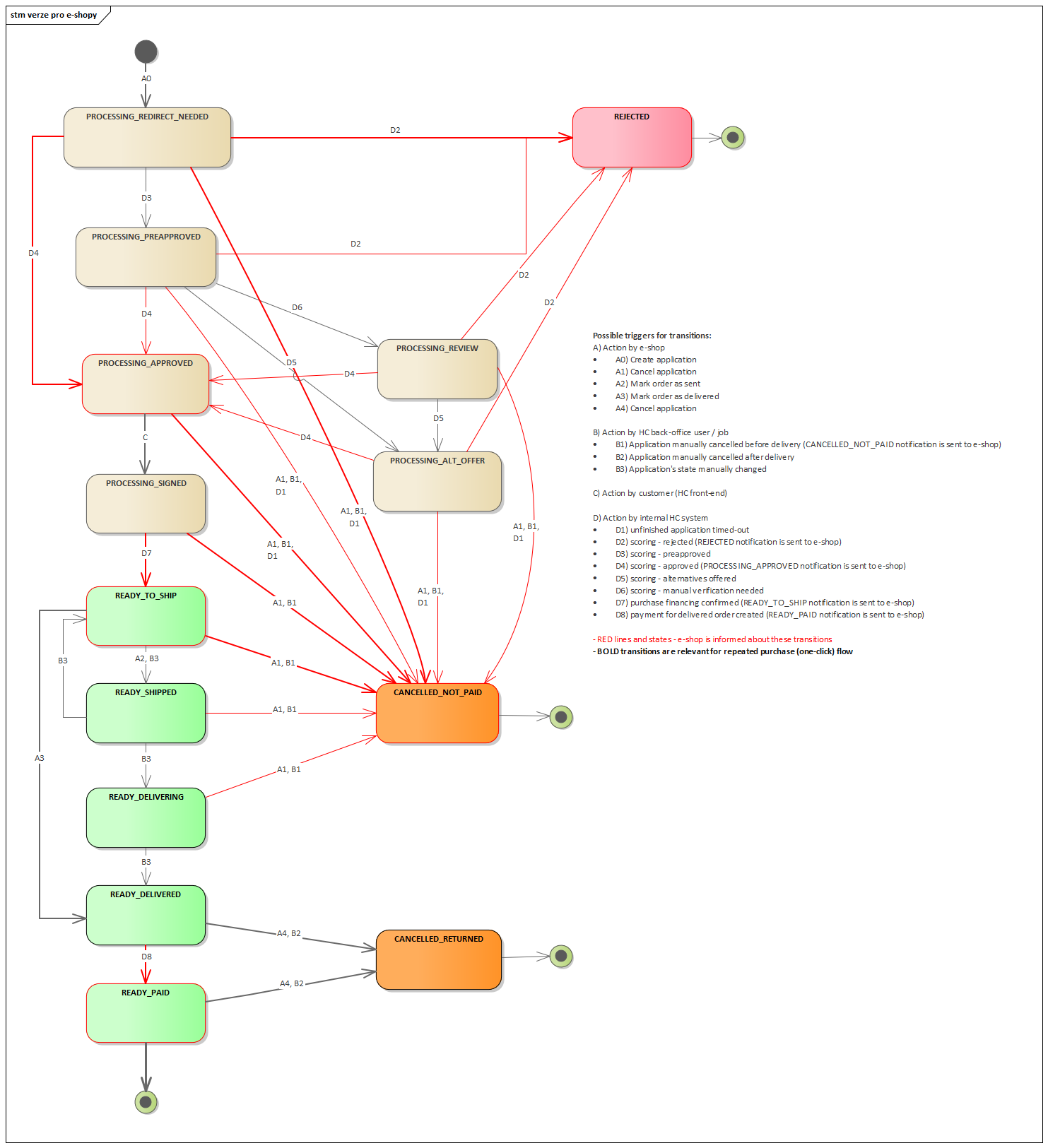
v1 state | v1 stateReason | v3 status |
|---|---|---|
PROCESSING | PROCESSING_REDIRECT_NEEDED | CREATED |
PROCESSING | PROCESSING_PREAPPROVED | PRESCORED |
PROCESSING | PROCESSING_APPROVED | APPROVED |
PROCESSING | PROCESSING_REVIEW | VERIFICATION |
PROCESSING | PROCESSING_ALT_OFFER | ALTERNATIVE |
PROCESSING | PROCESSING_SIGNED | APPROVED |
READY | READY_TO_SHIP | CONFIRMED + order TO_SHIP |
READY | READY_SHIPPED | CONFIRMED + order SHIPPED |
READY | READY_DELIVERING | CONFIRMED + order CHECKING_DELIVERY |
READY | READY_DELIVERED | CONFIRMED + order DELIVERED |
READY | READY_PAID | CONFIRMED + order PAID |
REJECTED | REJECTED | REJECTED |
CANCELLED | CANCELLED_NOT_PAID | CANCELLED + order CANCELLED |
CANCELLED | CANCELLED_RETURNED | CANCELLED + order TERMINATED |
IMPORTANT: In v3, the order state is separated from the application state. For complete information, use the endpoint GET /financing/v3/applications/{applicationId}.
2.5 Notification - structure changes
| Change | v1 | v3 | Impact |
|---|---|---|---|
| Structure | Flat attributes | notificationContent object | MEDIUM |
| Application state | stateReason | applicationStatus | HIGH - different values |
| Order state | orderState | orderStatus | LOW - renaming |
| Down payment | AmountOld (amount + currency) | Amount (value + currency) | LOW - attribute renaming |
3. Lifecycle operation changes
3.1 Create application
Availability: No change in both versions
HTTP method: POST
Change impact: CRITICAL
Key changes:
- Completely different request structure (see sections 2.1 - 2.3)
- Response structure change
- Duplicate logic remains the same (200 vs 201 vs 422)
3.2 Application detail
| Operation | v1 | v3 | Change |
|---|---|---|---|
| Get Application Detail | GET /financing/v1/applications/{applicationId} | GET /financing/v3/applications/{applicationId} | NEW endpoint in v3 - recommended to implement |
| Get Order | GET /financing/v1/orders?applicationId={id} | Removed | Order detail now via application detail |
Impact: MEDIUM - change in how to retrieve order information
3.3 Mark shipment/delivery
| Operation | v1 | v3 | Impact |
|---|---|---|---|
| Mark as Sent | PUT /financing/v1/applications/{id}/order/send | PUT /financing/v3/applications/{id}/orders/ship | LOW - URL change |
| Mark as Delivered | PUT /financing/v1/applications/{id}/order/deliver | PUT /financing/v3/applications/{id}/orders/deliver | LOW - URL change |
Key change: In v3, there is no endpoint for send, only ship and deliver.
Availability in v3:
-
Ship: Only for
CONFIRMED+TO_SHIPstates -
Deliver: Only for
CONFIRMED+TO_SHIPstates
Response in v3: Status 204 (No Content) instead of 200 with response body
3.4 Cancel application
| Operation | v1 | v3 | Impact |
|---|---|---|---|
| Cancel Application | PUT /financing/v1/applications/{id}/cancel | PUT /financing/v3/applications/{id}/cancel | LOW |
Key changes:
- Request body slightly modified (same
reasonenum values in principle) - Response in v3: Status 200 (instead of 200 with Application object)
- Availability in v3 is extended (more states can be cancelled)
New states available for cancel in v3:
-
CREATED+IN_PROCESS -
PRESCORED+IN_PROCESS -
ALTERNATIVE+IN_PROCESS -
APPROVED+IN_PROCESS -
CONFIRMED+ any exceptPAID -
CANCELLED+CANCELLED(idempotent)
3.5 Order modification
v1: PUT /financing/v1/applications/{applicationId}/order
v3: Removed
Impact: HIGH - if this endpoint was used for changing order number or variable symbol, an alternative solution must be found
4. New features in v3
4.1 Brokered orders support
v3 introduces the ability to create "brokered" orders for multi-party business relationships.
Usage example:
{
  "financedSubject": {
    "type": "ORDER",
    "order": {
      "type": "BROKERED",
      "brokered": {
        "merchantOrders": [
          {
            "name": "MALL",
            "number": "22222222",
            "items": [...]
          }
        ]
      }
    }
  }
}
4.2 Entrepreneurs and legal entities support
In v3, applications can now be created for:
-
PERSON(natural person) - corresponds to v1 -
ENTREPRENEUR(entrepreneur) -
LEGAL_ENTITY(legal entity)
4.3 Workflow steps
The v3 response contains workflowSteps[] - structured information about next process steps.
4.4 Origination context
New structure for tracking application source:
-
precheckIds- link to precheck -
sourceId- campaign identifier -
extendedData- UTM parameters, tracking info
5. Data format changes
5.1 Amount structure
| v1 | v3 |
|---|---|
{ "amount": 13300, "currency": "CZK" } | { "value": 13300, "currency": "CZK" } |
Impact: MEDIUM - everywhere amount is used, amount → value must be changed
5.2 Phone number structure
| v1 | v3 |
|---|---|
"phone": "+420777123456" | "mobile": { "countryCode": "+420", "value": "777123456" } |
Impact: MEDIUM - phone number parsing
5.3 Address flags vs addressType
| v1 | v3 |
|---|---|
"addressType": "PERMANENT" | "flags": ["PERMANENT"] |
Impact: LOW - change from enum to array
6. Redirect URL parameter changes
When redirecting the customer back to the partner site, v3 adds/modifies parameters:
| Parameter | v1 | v3 |
|---|---|---|
stateReason | Yes | Removed |
applicationStatus | No | New |
orderStatus | No | New |
orderNumber | Yes | Yes (if available) |
applicationId | Yes | Yes |
withdrawal | Yes | Yes (if available) |
downPayment | Yes | Yes |
checkSum | Yes | Yes (checksum) |
Impact: MEDIUM - redirect parameter parsing needs to be updated